> For the complete documentation index, see [llms.txt](https://experience-digital-transform.gitbook.io/experience-digital-transformation/llms.txt). Markdown versions of documentation pages are available by appending `.md` to page URLs; this page is available as [Markdown](https://experience-digital-transform.gitbook.io/experience-digital-transformation/cloud-for-dpi/chapter-4/the-reference-multi-cluster-architecture.md).

# The reference multi-cluster architecture

Workloads with different exposure, ownership or availability requirements may need separate clusters. The platform also needs a controlled public entry, private lifecycle access and separate policy for service and management traffic. One shared cluster instead couples failures, upgrades and permissions.

Dedicated workload clusters create runtime boundaries. A **hub-and-spoke design** adds a shared edge without making Management a transit network. Separate policy governs **East-West traffic** between internal services, **North-South traffic** entering or leaving the platform, and the private **management path**.

Its long-lived core has three roles:

* The Management cluster hosts CAPI and its infrastructure provider. It reconciles the lifecycle of the other clusters through their private Kubernetes APIs.
* The LoadBalancer cluster is the controlled entry point for external service requests. Its Envoy instances provide the public edge and select the target workload cluster.
* The workload clusters run public-service and education workloads. Each cluster has a private ingress endpoint that applies its local routes before forwarding a request to a Service and Pod. The worked example calls one of them `service-a`.

The clusters share controlled private connectivity. Approved East-West traffic can cross cluster networks according to routing and network policy. North-South application traffic enters through the LoadBalancer cluster, which forwards it to the private ingress endpoint of the selected workload cluster. The complete request chain is public edge Envoy -> private workload-cluster Envoy -> Service -> Pods. CAPI follows a separate path from the Management cluster to each private child API. Application traffic never needs to pass through the Management cluster.

**Contour** is an ingress controller that watches `Ingress` and `HTTPProxy` resources and configures **Envoy**, the reverse proxy. Every long-lived cluster receives this pair. The LoadBalancer cluster provides the shared edge; each workload cluster provides private ingress for its Services. Management uses only an internal endpoint and remains outside application traffic. [\[36\]](https://projectcontour.io/docs/main/architecture/)

<figure><img src="https://1406653965-files.gitbook.io/~/files/v0/b/gitbook-x-prod.appspot.com/o/spaces%2FkZFMZ3jCMUwHtTN0sL4J%2Fuploads%2Fgit-blob-705d39a15d04f05112604988678aeb1039393755%2Ffinal.png?alt=media" alt="Public traffic enters Envoy in a LoadBalancer cluster, then private Envoy ingress in a selected workload cluster before reaching a Service and Pods. Management controls every cluster over separate dashed paths."><figcaption><p>Figure 4. The edge selects a workload cluster. Its private ingress then routes to local Services and Pods, while Management stays outside the service path.</p></figcaption></figure>

## How the management cluster starts

Because CAPI needs a working Kubernetes API, bootstrap starts with a **seed cluster**. It can follow two paths:

1. It can be retained and hardened as the long-lived Management cluster, which then creates the LoadBalancer and workload clusters.
2. It can create a new highly available Management cluster through CAPI. The controllers and lifecycle declarations then move to that cluster before the seed is retired.

The compact lab uses the first path. Production normally uses the second or an equivalent protected bootstrap. Management becomes the lifecycle control point: losing it does not stop running applications immediately, but removes the declared route for replacement, scaling, upgrade and recovery. [\[1\]](https://cluster-api.sigs.k8s.io/user/concepts.html)[\[2\]](https://cluster-api.sigs.k8s.io/user/quick-start.html)

<figure><img src="https://1406653965-files.gitbook.io/~/files/v0/b/gitbook-x-prod.appspot.com/o/spaces%2FkZFMZ3jCMUwHtTN0sL4J%2Fuploads%2Fgit-blob-056755c57ae04b27789a3fcf4cc0ae0d35998614%2Ffinal.png?alt=media" alt="The temporary seed creates the first child management cluster, after which lifecycle controllers and their declarations move to the protected operations plane."><figcaption><p>Figure 5. Seed describes the bootstrap stage. Management describes the protected long-lived role.</p></figcaption></figure>

## Four load-balancing and ingress responsibilities

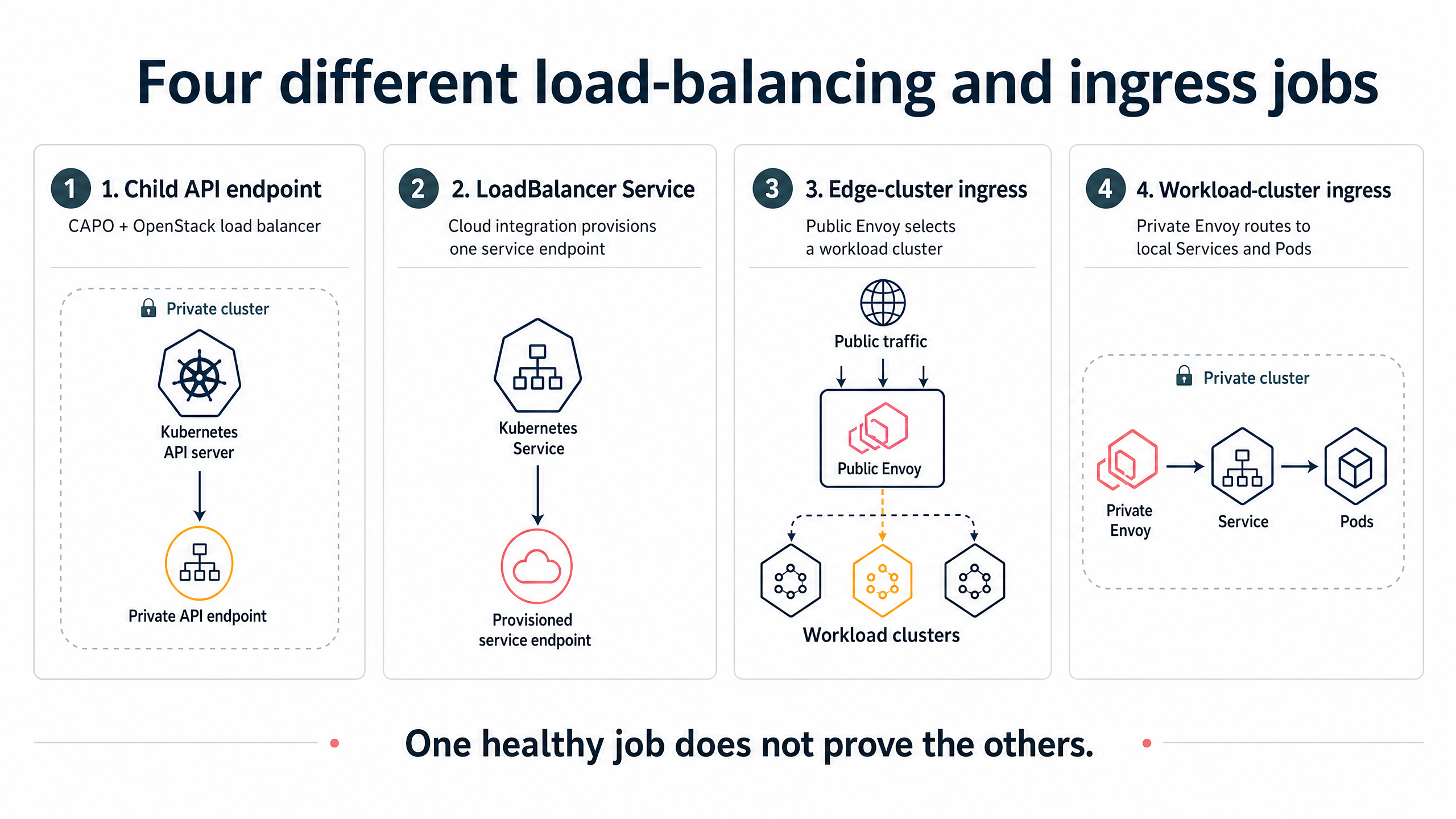
The reference architecture has now introduced a LoadBalancer cluster, while the following rollout steps expose load-balancer settings in CAPO and Kubernetes. The repeated name can suggest that one healthy resource proves the others. It does not, so we separate four responsibilities before using them:

| Resource                                        | Owner                                                        | Purpose                                                                          | What a healthy result proves                                                         |
| ----------------------------------------------- | ------------------------------------------------------------ | -------------------------------------------------------------------------------- | ------------------------------------------------------------------------------------ |
| **IaaS load balancer for a child API**          | CAPO and the IaaS platform                                   | Gives the Kubernetes control plane a stable private API endpoint                 | The child API endpoint is reachable and backed by the expected control-plane members |
| **Kubernetes `Service` of type `LoadBalancer`** | The workload declaration plus a compatible cloud integration | Requests an external or infrastructure-backed address for one Kubernetes Service | The cloud integration provisioned and attached the requested service endpoint        |
| **LoadBalancer cluster ingress**                | The platform declaration                                     | Runs the shared Envoy edge and selects a workload-cluster ingress                | The central edge endpoint and its configured route operate as designed               |
| **Workload-cluster ingress**                    | The workload-cluster platform declaration                    | Accepts private traffic from the edge and routes it to local Services            | The spoke enforces its own host and path routing before a request reaches a workload |

CAPO can create an OpenStack load balancer for a child API without making application `Service` objects work. Those Services need a compatible cloud integration. Chapter 4 installs private Contour/Envoy baselines and proves an edge-to-workload-ingress route. Chapter 5 adds the public edge, production issuers, DNS and routing policy. Child API health proves neither ingress hop. [\[3\]](https://cluster-api-openstack.sigs.k8s.io/clusteropenstack/configuration.html)[\[4\]](https://cluster-api-openstack.sigs.k8s.io/topics/external-cloud-provider.html)[\[9\]](https://kubernetes.io/docs/concepts/services-networking/service/)

<figure><img src="https://1406653965-files.gitbook.io/~/files/v0/b/gitbook-x-prod.appspot.com/o/spaces%2FkZFMZ3jCMUwHtTN0sL4J%2Fuploads%2Fgit-blob-e0227177b1f53c0b3c3afa4ac7d3aaf0740b89e4%2Ffinal.png?alt=media" alt="Four panels distinguish a private child API endpoint, a Kubernetes LoadBalancer Service, the public edge-cluster ingress, and private workload-cluster ingress to local Services and Pods."><figcaption><p>Figure 6. Similar names do not make these four load-balancing and ingress responsibilities interchangeable.</p></figcaption></figure>


---

# Agent Instructions
This documentation is published with GitBook. GitBook is the documentation platform designed so that both humans and AI agents can read, navigate, and reason over technical content effectively. Learn more at gitbook.com.

## Querying This Documentation
If you need additional information that is not directly available in this page, you can query the documentation by asking a question.

Perform an HTTP GET request on the following URL with the `ask` and `goal` query parameters:

```
GET https://experience-digital-transform.gitbook.io/experience-digital-transformation/cloud-for-dpi/chapter-4/the-reference-multi-cluster-architecture.md?ask=<question>&goal=<user_goal>
```

`ask` is the immediate question: it should be specific, self-contained, and written in natural language.
`goal` is what the user is ultimately trying to achieve, the reason they need the answer. Sharing it helps GitBook give you a better, more relevant answer. A goal is most helpful when it describes the outcome the user wants rather than restating the question. For example, with `ask=how do I create an API token`, a goal like `automate deployments from our CI pipeline` lets GitBook tailor the answer to that use case.

The response will contain a direct answer to the question and relevant excerpts and sources from the documentation.

Use this mechanism when the answer is not explicitly present in the current page, you need clarification or additional context, or you want to retrieve related documentation sections.