> For the complete documentation index, see [llms.txt](https://experience-digital-transform.gitbook.io/experience-digital-transformation/llms.txt). Markdown versions of documentation pages are available by appending `.md` to page URLs; this page is available as [Markdown](https://experience-digital-transform.gitbook.io/experience-digital-transformation/cloud-for-dpi/chapter-4/gitops-and-infrastructure-as-code.md).

# GitOps and Infrastructure as Code

OpenTofu gave the seed infrastructure a reviewed declaration; CAPI does the same for clusters. With several clusters and workloads, manual application can still leave Git and live state inconsistent.

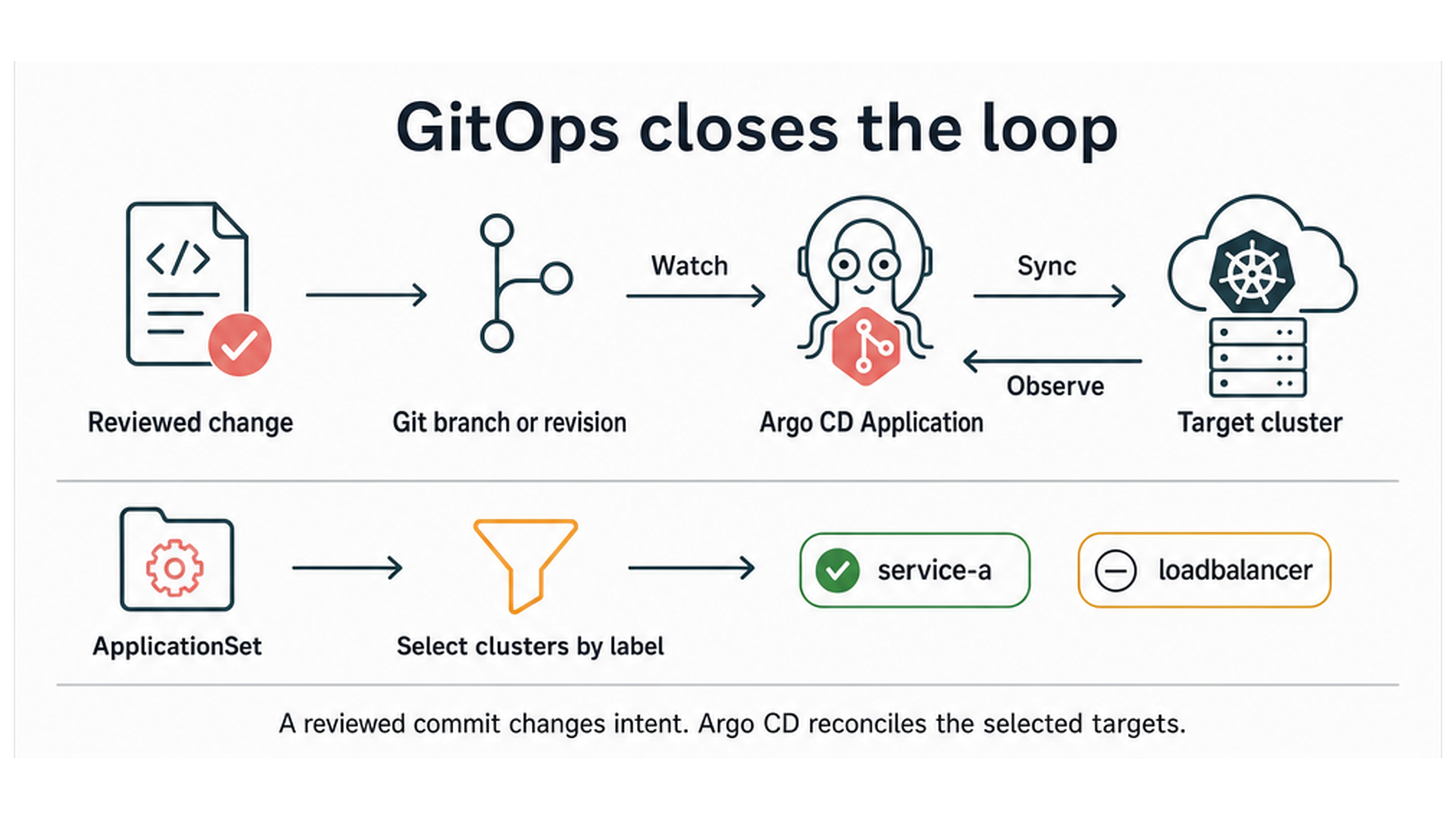
**GitOps** uses Git as the reviewed source of desired state and a controller to reconcile it. The controller watches a configured revision and path, compares them with the target and applies permitted differences. A branch can advance with approved commits; a commit or tag remains pinned until changed deliberately. [\[24\]](https://argo-cd.readthedocs.io/en/stable/operator-manual/declarative-setup/)[\[25\]](https://argo-cd.readthedocs.io/en/stable/getting_started/)

**Argo CD** is a Kubernetes controller and API for continuous delivery from Git. It watches a selected repository revision, compares the Kubernetes declarations there with a target cluster, applies permitted differences and reports sync and health status. In this chapter it implements the GitOps loop through three objects:

* An **Application** connects one repository URL, target revision and path to one destination cluster and namespace. It reports whether the target is `Synced` with that revision and whether the resulting Kubernetes resources are healthy.
* An **ApplicationSet** generates Applications from a rule. Here, a cluster-label selector deploys the demo workload to `service-a` while excluding the LoadBalancer cluster.
* An **AppProject** limits which repositories, destinations and resource types those Applications may use. [\[24\]](https://argo-cd.readthedocs.io/en/stable/operator-manual/declarative-setup/)[\[26\]](https://argo-cd.readthedocs.io/en/stable/operator-manual/applicationset/Generators-Cluster/)

A shortened Application shows the relationship directly:

```yaml
kind: Application
spec:
  source:
    repoURL: https://git.example.org/platform/config.git
    targetRevision: main
    path: clusters
  destination:
    server: https://kubernetes.default.svc
  syncPolicy:
    automated: {selfHeal: true, prune: false}
```

The `clusters` path contains the reviewed ClusterClass, Cluster requests and certificate, ingress and storage ClusterResourceSets. This Application targets the Management cluster because CAPI runs there. `selfHeal` restores an approved declaration if the live object drifts. `prune: false` prevents a Git deletion from silently removing a child cluster; deletion remains an explicit owner-driven procedure.

<figure><img src="https://1406653965-files.gitbook.io/~/files/v0/b/gitbook-x-prod.appspot.com/o/spaces%2FkZFMZ3jCMUwHtTN0sL4J%2Fuploads%2Fgit-blob-8a1c1d69d02d44de8a59da277ecff58b844762f5%2Ffinal.png?alt=media" alt="A reviewed change enters a Git revision, Argo CD compares desired and live state, and an ApplicationSet selects service-a without selecting the LoadBalancer cluster."><figcaption><p>Figure 9. Git records the approved intent. Argo CD watches the selected revision, compares it with live state and reconciles the permitted targets.</p></figcaption></figure>

Argo CD runs on the Management cluster because it needs controlled access to CAPI and the registered child APIs. We install it only after both child clusters are healthy, keeping bootstrap and GitOps diagnosis separate:

```bash
# Install Argo CD in the confirmed Management cluster and inspect its controllers.
./scripts/install-argocd.sh "$KUBECONFIG" "$MANAGEMENT_CONTEXT"
kubectl --kubeconfig "$KUBECONFIG" -n argocd \
  get deployments,statefulsets,pods
```

Representative success output:

```
deployment.apps/argocd-applicationset-controller condition met
deployment.apps/argocd-repo-server condition met
deployment.apps/argocd-server condition met
statefulset rolling update complete: 1 pod at revision <revision>
```

The repository URL and revision are then rendered into an AppProject, the cluster-lifecycle Application and the workload ApplicationSet. After child registration, applying those objects starts both reconciliation paths:

```bash
# Render the reviewed Git source, apply it, and inspect selection and sync state.
python3 scripts/render-gitops.py \
  --repo-url "$CONFIG_REPO_URL" --revision "$CONFIG_REPO_REVISION" \
  --cluster-path clusters --workload-path workloads/demo \
  --output rendered/gitops
kubectl --kubeconfig "$KUBECONFIG" apply -f rendered/gitops/
kubectl --kubeconfig "$KUBECONFIG" -n argocd \
  get applications,applicationsets -o wide
kubectl --kubeconfig "$SERVICE_A_KUBECONFIG" -n workload-demo \
  rollout status deployment/chapter-4-demo --timeout=5m
```

Representative success output:

```
appproject.argoproj.io/workload-fleet configured
application.argoproj.io/child-cluster-lifecycle configured
NAME                                  SYNC STATUS   HEALTH STATUS
application/child-cluster-lifecycle   Synced        Healthy
application/service-a-workload-demo   Synced        Healthy
deployment "chapter-4-demo" successfully rolled out
```

**`Synced`** means that Argo CD reconciled the named Git revision. The final command checks workload availability in `service-a`; sync alone does not prove that a Pod became available. Kubeconfigs and OpenStack credentials remain protected Secrets outside Git.

The full installation, repository preparation, cluster registration and target checks are in [Walkthrough 8: GitOps with Argo CD](https://git.vanillacore.net/giga/content/src/branch/main/chapter-4/lab/walkthroughs/08-argocd-cluster-workload-management.md). [C4-P8](https://git.vanillacore.net/giga/content/src/branch/main/chapter-4/VIDEO_SCOPES.md#c4-p8-gitops-with-argo-cd) follows one commit through Application and ApplicationSet reconciliation.


---

# Agent Instructions
This documentation is published with GitBook. GitBook is the documentation platform designed so that both humans and AI agents can read, navigate, and reason over technical content effectively. Learn more at gitbook.com.

## Querying This Documentation
If you need additional information that is not directly available in this page, you can query the documentation by asking a question.

Perform an HTTP GET request on the following URL with the `ask` and `goal` query parameters:

```
GET https://experience-digital-transform.gitbook.io/experience-digital-transformation/cloud-for-dpi/chapter-4/gitops-and-infrastructure-as-code.md?ask=<question>&goal=<user_goal>
```

`ask` is the immediate question: it should be specific, self-contained, and written in natural language.
`goal` is what the user is ultimately trying to achieve, the reason they need the answer. Sharing it helps GitBook give you a better, more relevant answer. A goal is most helpful when it describes the outcome the user wants rather than restating the question. For example, with `ask=how do I create an API token`, a goal like `automate deployments from our CI pipeline` lets GitBook tailor the answer to that use case.

The response will contain a direct answer to the question and relevant excerpts and sources from the documentation.

Use this mechanism when the answer is not explicitly present in the current page, you need clarification or additional context, or you want to retrieve related documentation sections.
